Artificial Intelligence
How I Start Each Day With Claude Code
Series: AI & Engineering
My morning planning routine is a Claude Code skill that talks to Todoist and Google Calendar. Here's how I rebuilt it from a slow chain of skills into one pass, and how I test it with evals so I don't break it.
How I Start Each Day With Claude Code
Last year I wrote about how I use ChatGPT and Todoist to plan my day in under 10 minutes. I'd dictate what I needed to get done, ChatGPT would estimate and prioritize it, and it would hand me a block of Todoist Quick Add syntax to paste in. At the end of that post I said there might be a future agentic version, where something plans the day with me instead of handing me text to copy.
That's basically what I use now. It's a Claude Code skill called start-my-day, and it talks to Todoist and Google Calendar directly. It took a few versions to get right, though, and the one I use today is pretty different from the one I had a month ago. This post covers how it works, what I changed and why, and how I test it with evals so I don't break it every time I edit it.
What a skill is
A skill in Claude Code is a folder with a SKILL.md file in it. The file has a description that tells Claude when to use the skill, and instructions for what to do once it does. I keep mine in a personal plugin marketplace on GitHub, grouped into plugins by where the data lives. start-my-day is in a plugin called day, next to smaller skills for things like finding a task, moving something to another day, or grooming my Todoist Inbox.
When I say "start my day" (or "let's run the morning routine"), Claude loads the skill and follows it, using the Todoist and Google Calendar connectors.
The first version was a chain
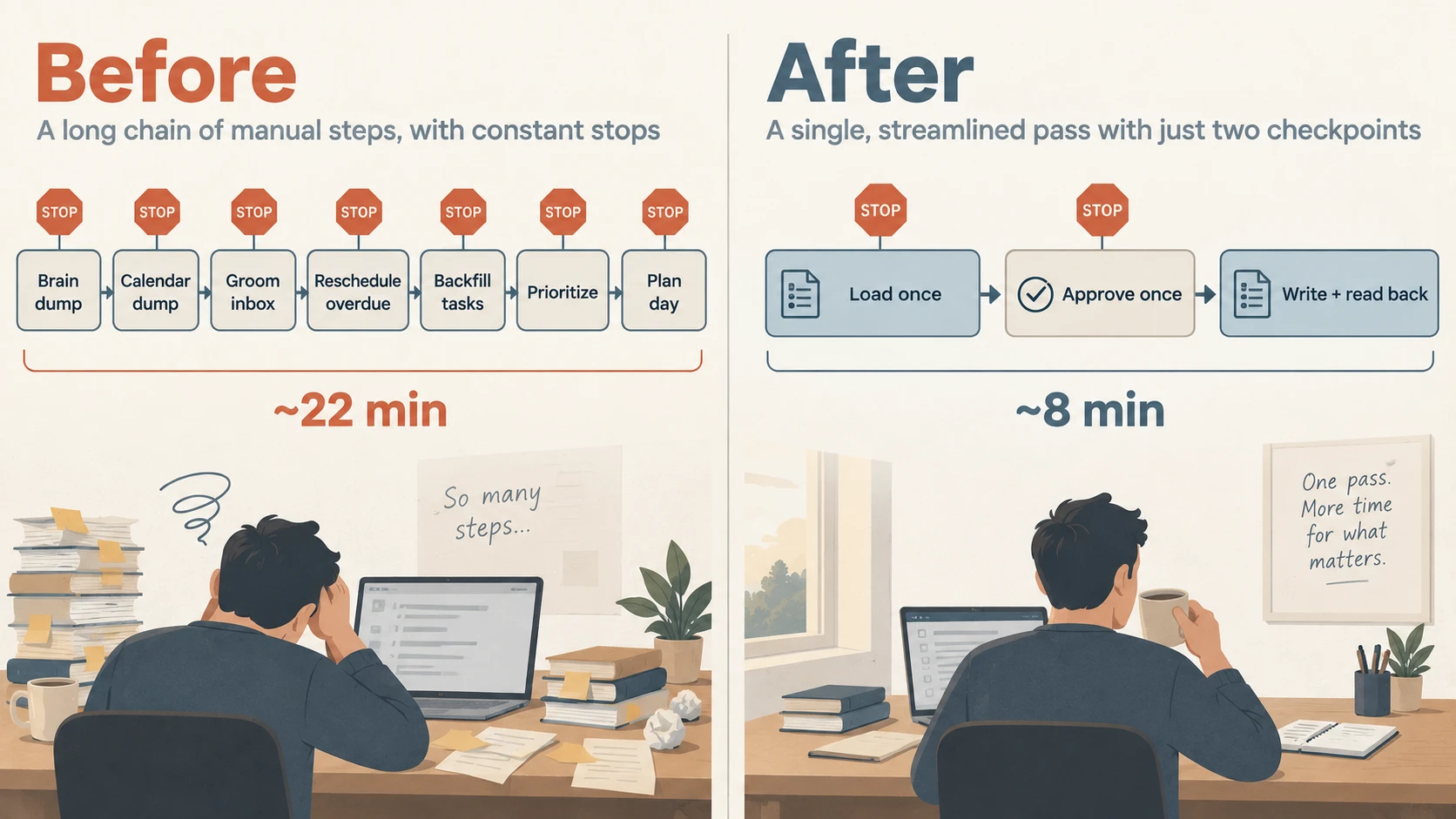
For most of August and September, start-my-day was a chain of other skills. It asked me what was on my mind, asked what was happening today that wasn't on the calendar yet, and then ran five skills in order: groom the Inbox, reschedule overdue tasks, create tasks for calendar work that didn't have one, prioritize today, and plan the day into calendar blocks.
Each of those skills was fine on its own. Chained together, they were slow. Every stage re-read Todoist and Google Calendar, every stage had its own approval step, and every stage wrote its changes right away. That added up to 7 stops where I had to read something and reply, and about 1,700 lines of instructions loaded along the way. One run I looked back at in early September took about 22 minutes, and that was on a light day with an empty Inbox and nothing overdue.
It also produced a lot of text. I'm pretty visual, and I don't do well with big walls of it, so by the time the plan came out I wasn't reading it very carefully anymore.
There were bugs along the way too. In one run I mentioned a yard project I wanted to get to, and the skill found an existing (undated) task for it, decided it was a duplicate, and scheduled nothing. For a while I also had some of the heavier stages hand work off to background subagents, until I noticed that in the desktop app they didn't have access to the connectors - and some of them reported tasks as filed anyway, without making a single tool call.
Changing the approach
The goal was still the one from 2025: plan the day in under 10 minutes, with a lot less to read. Trimming instructions or speeding up individual stages would have shaved a few minutes off, but it wouldn't have gotten me there.
When I looked at the whole plugin, about half of the 20 skills in it existed to clean up drift the system created on its own. I was creating calendar blocks for tasks, so I needed skills to keep the blocks and the tasks in sync. I was setting priorities, so I needed a skill to re-rank everything every morning. A good chunk of every morning was going to cleaning up after yesterday before I could even start planning today.
So the new strategy was pretty simple:
- Stop creating things that have to be kept in sync. Each kind of thing lives in exactly one place.
- Load everything once, up front, instead of at every stage.
- Make every decision on screen, and write nothing until I've approved the whole day at once.
- Only show what changes what I'm about to say next.
What I changed
I rebuilt the skill around that as one pass, and deleted 10 of those skills (about 2,700 lines) in the process.
The biggest change is that Todoist holds tasks and Google Calendar holds events, and that's it. The calendar only gets real events now, like meetings, appointments and pickups. Tasks never get a calendar block. Instead, every task on today's list gets its own start time and duration in Todoist. Todoist's calendar view can also show Google Calendar events next to your tasks (read-only, under Settings > Calendars), so I still get one timeline for the day, with nothing to keep in sync.
I also dropped priorities completely. When I thought about it, I don't actually plan my day by priority. It runs on set times, because most of my work waits on other people, and on what I feel like doing next. So the skill never shows, asks about, or sets a priority anymore.
The skill now reads everything it needs up front, in two rounds of tool calls, and skips shared projects (a shared grocery list isn't part of my day). After that, every change is staged in memory - moving overdue tasks to today, new captures, Inbox grooming, start times - and nothing is written until I approve one combined change list at the end. If I stop halfway through, nothing happened, and there's nothing half-done to clean up.
On a normal day that means two stops. The first screen shows my day as it'll look once the overdue tasks move over, and asks one question: "What else needs to happen today, and does anything need a set time?" I answer with a brain dump. If there's anything to sort (new items, or captures sitting in my Inbox), I get one table showing where each thing will go, and I correct whatever's wrong. Then there's one review screen, and I say go.
Here's roughly what that first screen looks like:
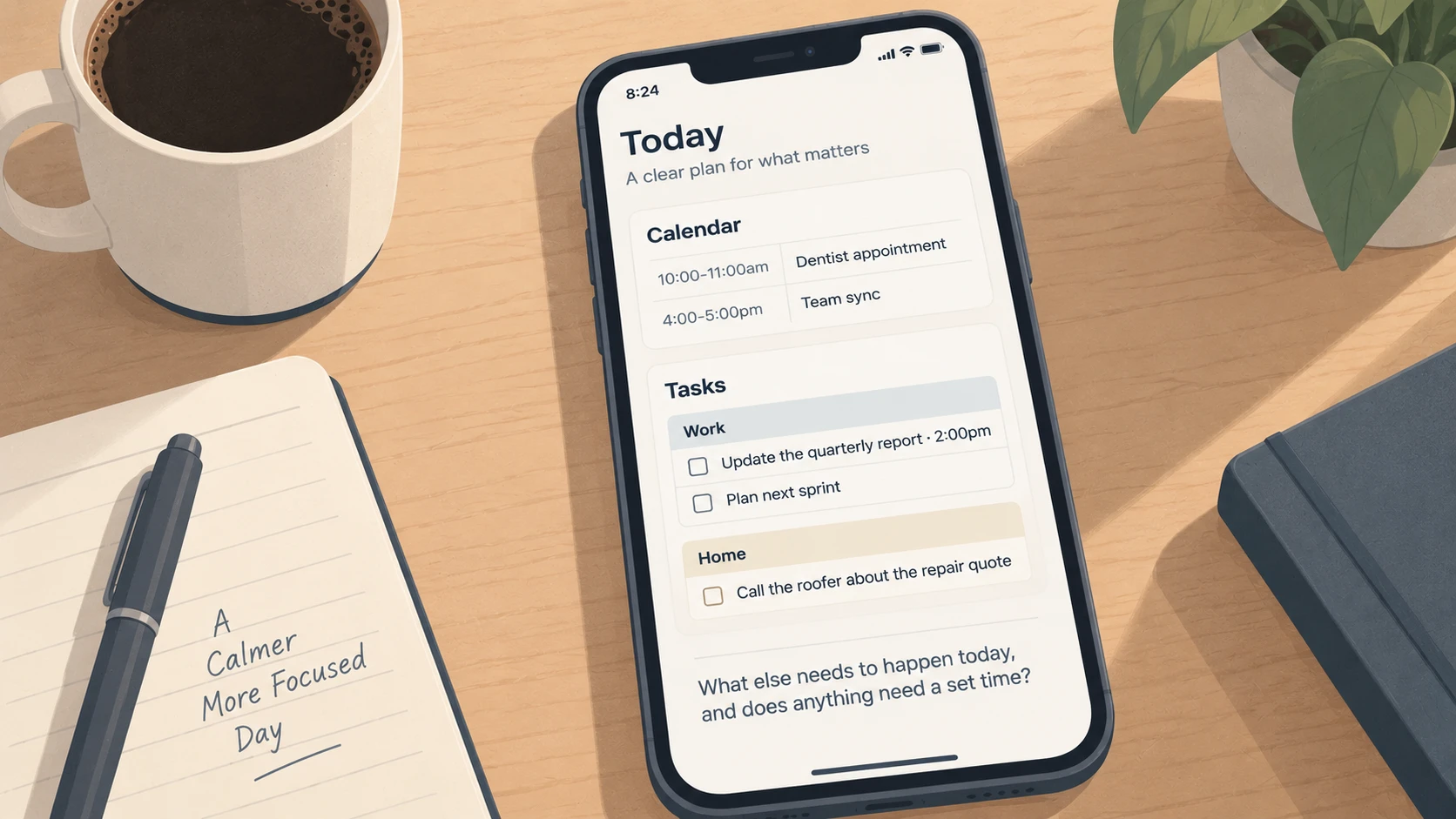
It's bare on purpose. There are no counts, no estimates, no priorities, and none of my daily routines like brushing my teeth. Those are on the list every day, so showing them would just bury the stuff I'm actually planning.
The small rules that matter
Some of the rules in the skill are pretty specific to me, but they're the ones that made it usable:
- Work that waits on other people goes after noon. Most of the people I work with start their day around noon my time, and deployments need approvals. If I pick an earlier time anyway, it says "before most approvers are online" once and moves on.
- Nothing is numbered. I refer to things by name, like "the bug spray one" or "all the reading ones", and it works out what I mean. If a name could match two things, it asks about that one instead of guessing.
- Every guessed duration is marked "est." so I know which numbers to double check.
- If the estimates don't fit in the day, it doesn't cram them in. It proposes moving specific tasks off today, and says why it picked each one.
- Each of today's tasks gets a clarity score from 0 to 10, based on whether it has a real next action (4 points), a definition of done (3), the context I'd need to start (2), and whether it fits in one sitting (1). If the average is under 8.5, it shows the five weakest tasks with the one question that would fix each. The score never blocks me from saying go. The point is to fix a vague task while I'm sitting down to plan, and not at 3pm when I pick it up and have no idea what I meant.
- A lone correction counts as approval. If my reply to the review screen is just "move the article to tomorrow", it applies that and writes everything. It only asks again if my change would reshuffle other blocks.
After it writes, it reads everything back and only reports what the reads confirm. A successful response isn't proof on its own (Google Calendar will happily return OK on a new event and drop its location). Then it leaves a comment on each changed task saying what changed, like the date an overdue task originally missed.
Testing it with evals
A skill like this is really just a long markdown file, which makes it easy to break by accident. I'd tweak one rule and something three steps later would quietly start behaving differently. So I recently added regression evals for every plugin in my marketplace, using claude plugin eval.
Each eval case is a folder with a prompt and a set of graders. A grader can be a regex against Claude's last message, a regex against the tool calls it made, a check that a specific tool was used, or a plain-English rubric that a separate judge model scores. A small script pins the model under test, the judge model, a pass threshold of 0.8 (so one failed grader in one of three runs is fine), and a $40 cost ceiling per plugin, so two runs are actually comparable. I use Sonnet as the judge, since Haiku misread rubrics that depended on specific wording.
The important part for this skill is that eval runs never touch my real Todoist or Google Calendar. The day evals run against mock servers whose tool definitions are copied from the real connectors, with fixture data for a made-up day: a couple of overdue work tasks, a meeting from 2-3pm, a baseball game on the calendar I use for things I might watch, a shared grocery list, and some routines. I learned why that isolation matters the hard way - an early eval run for a different plugin had Bash access and restarted a real background service on my Mac. Plugins that touch system services don't get Bash in evals anymore.
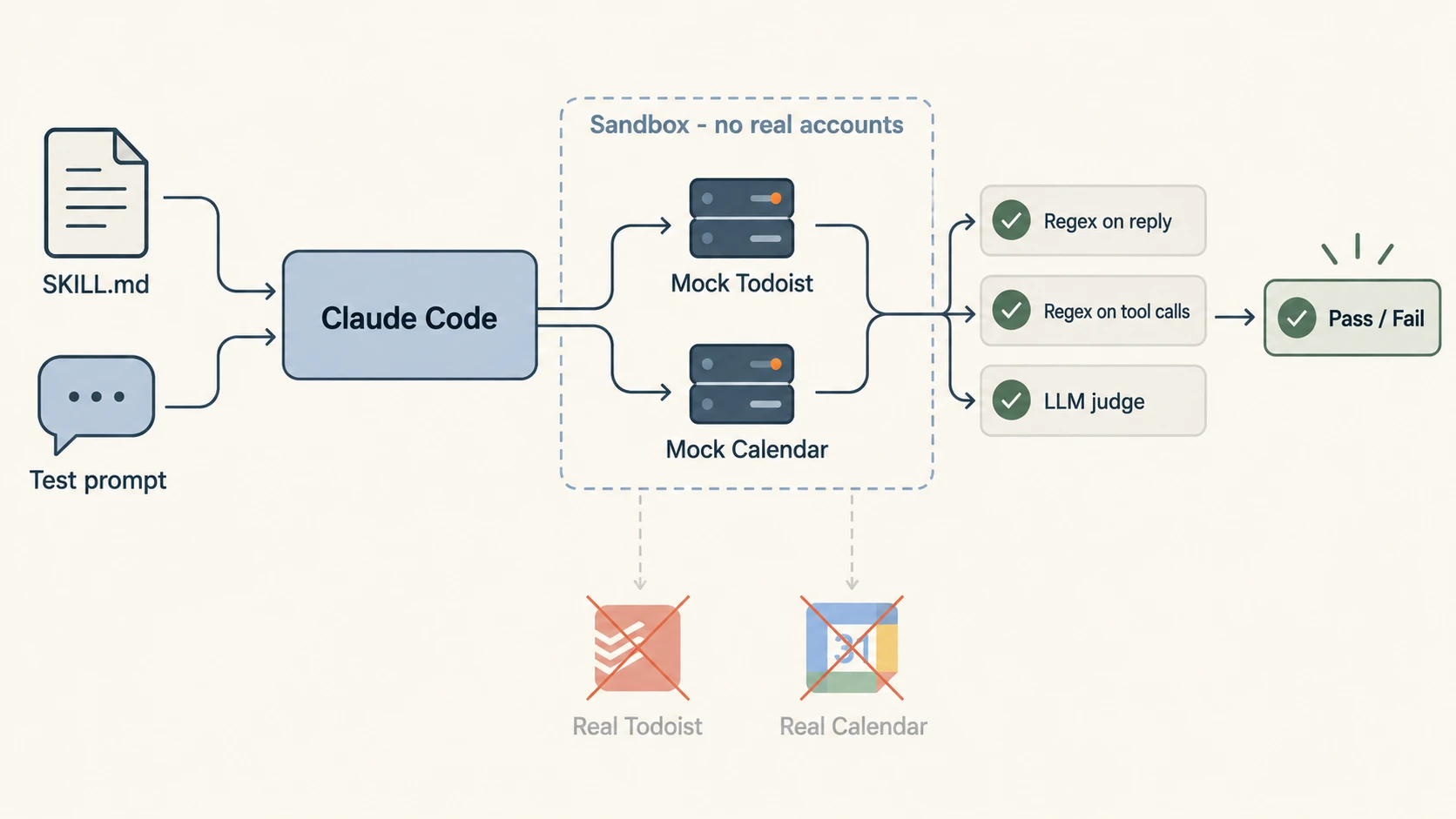
The start-my-day suite has five cases:
- Trigger: "morning! let's run the whole routine: overdue stuff, my inbox, the plan for today, all of it" should load the skill without me naming it.
- Day view: the first screen loads tasks and events, filters out the shared project in the query itself, shows both overdue tasks as due today, has no priorities, routines or numbering, writes nothing, and ends with the set-time question.
- Blocks every task: all six of today's tasks get a start and end time, estimates are marked "est.", nothing lands on the 2-3pm meeting, the task that needs another team's answer starts after noon, the existing 4:30 call keeps its time, and the baseball game is never flagged as a conflict.
- Isolated correction: moving one task to tomorrow applies the whole list without asking again.
- Rippling correction: swapping two work blocks and moving an errand to right before dinner asks me to confirm, and writes nothing.
The last three cases start partway through a conversation. They resume from a saved history that includes the current SKILL.md, the same way a real session has it loaded, and a small script regenerates those histories whenever I edit the skill.
They paid for themselves right away. My first version of the correction rule said a correction was isolated if it "touched only the items he named". The rippling case showed that swapping two named blocks technically fits that description, so the skill would just go ahead and write it. The isolated case caught the opposite problem: sometimes a correction wrote only itself and dropped the rest of the approved list. Both are fixed now. Re-timing two or more blocks always asks, and a go always applies the whole list.
The first full run across all my plugins passed 77 of 82 cases, and most of the failures were real bugs in the skills, not bad graders. My rule now is to read the trace before touching a grader, because loosening a grader until a real bug passes defeats the whole point of having one.
Where it's at
The old chain took about 22 minutes on a light day. The new version takes about 8 minutes end to end, and that includes the tool calls and the time it spends waiting on me. Most of those 8 minutes go to actual decisions.
I still love having my day planned and hate planning it, so anything that makes that part shorter is worth it to me.
Thanks for reading!