Artificial Intelligence
Rebuilding My Claude Code Voice Mode to Be Hands-Free
Series: AI & Engineering
My Claude Code voice setup started as VoiceMode's converse tool. It's now a push-to-talk loop I can start with a wake word, interrupt by talking over it, and move to a new session by voice - with all the speech running locally on my Mac.
A few weeks ago I started talking to Claude Code with VoiceMode, an MCP server that gives Claude a microphone and a voice. It worked, but Claude was the one running the conversation - it called a tool to listen, waited for me to go quiet, and guessed when I was done. I spent most of my time tuning silence cutoffs.
The setup I use now is pretty different. I say "Hey Jarvis" and voice mode starts. I talk, Claude answers out loud, and if I want to cut it off I just start talking. When I want a clean slate I say "new session" and the conversation moves to a fresh session, still in voice. All the speech side runs locally on my Mac, so my voice never leaves the machine - only the text goes to Claude.
The loop moved out of the model
The biggest change was taking the listening and speaking away from Claude. VoiceMode still runs the two local speech servers - Whisper for speech-to-text and Kokoro for text-to-speech - but the conversation itself now runs in a small Claude Code mod that adds a voice button above the prompt.
Each turn goes like this:
- A press opens the mic. Pressing again (or just going quiet, if auto-send is on) stops it.
- The clip goes to Whisper, gets deleted, and the transcript is sent as my message.
- Claude reads it and writes a reply like it would for anything I typed.
- The mod strips out anything you can't hear - code, tables, links, markdown - and Kokoro speaks the rest, one or two sentences at a time.
- When it's done speaking the mic opens again.
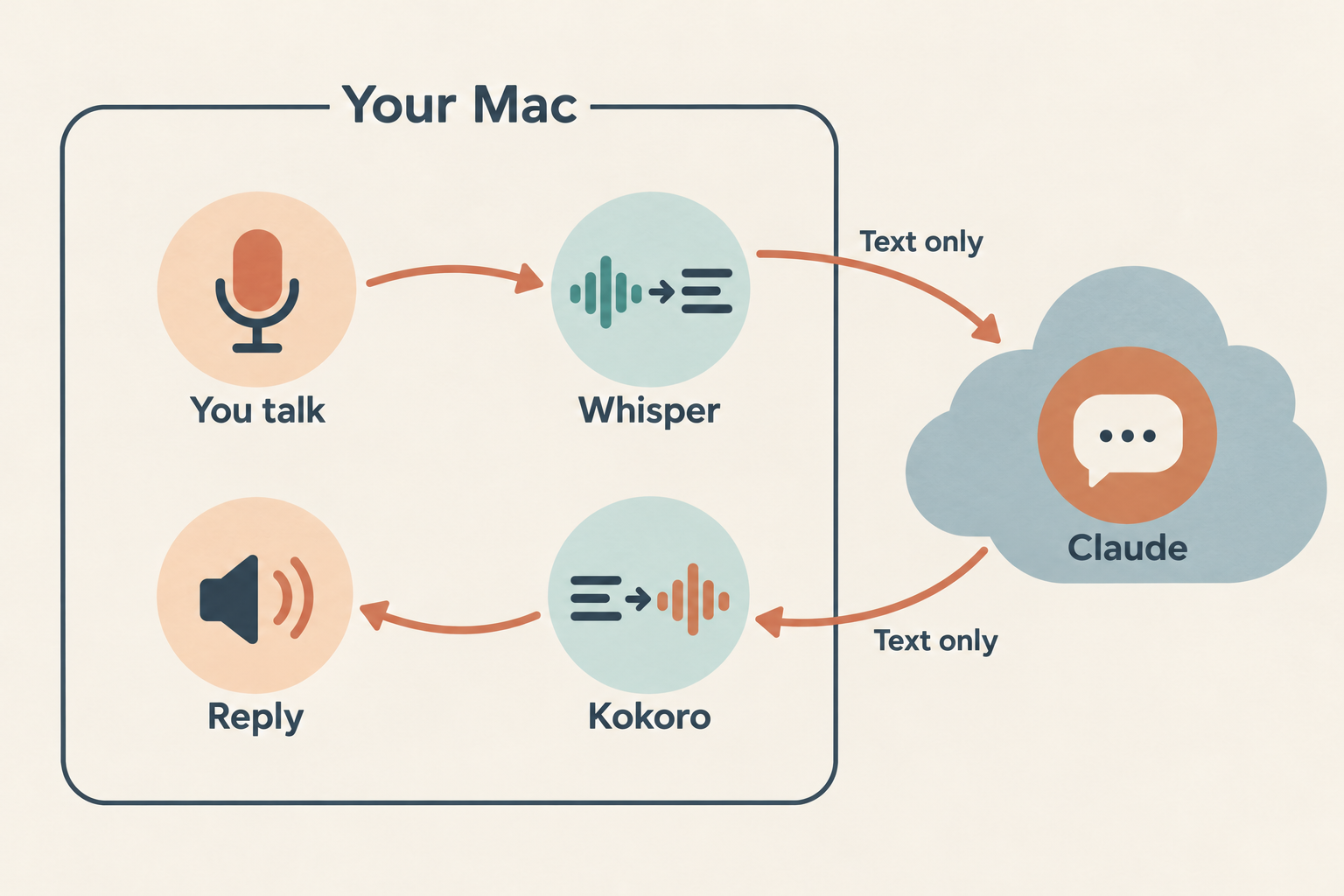
Claude never listens or speaks, it only reads transcripts and writes replies. While voice is on, the mod adds a short note to the system prompt telling Claude its replies will be read aloud, so it keeps them short and plain. That alone fixed most of what bugged me in the first version, since I decide when a turn ends, not a silence timer.
A soft two-note chime plays every few seconds while Claude is working, so a long gap doesn't feel like it crashed. There's also a speed button, since Kokoro's default pace is kind of slow to listen to.
Starting it with a wake word
Sending a message that's just 0 presses the voice button, and I had a key on my Scramble macropad bound to 0 and Enter. That worked fine, but I wanted something closer to Alexa or Google Home.
So now there's a wake word running on the Mac. It uses openWakeWord with its built-in "Hey Jarvis" model, and when it hears it, it brings Claude to the front and types 0 and Enter - the same thing the macropad does.
Privacy was my main concern with an always-on mic, so a few things about how it works:
- It only holds about 80 ms of audio at a time, scores it, and throws it away. Nothing is recorded or saved to disk.
- It never makes a network call. The model files download once at setup.
- It has a menu bar icon with an on/off switch, and off actually closes the mic, so the orange mic indicator goes away.
- It ignores "Hey Jarvis" while a voice turn is already listening or speaking.
macOS was the annoying part. Typing keys needs Accessibility permission, and running it from Homebrew's Python meant granting that to every Python script on the machine. I wrapped it in a tiny app bundle with a C launcher so the permission belongs to just that app, and a LaunchAgent starts it at login.
Talking over replies
This is the one I'm most happy with. Before, cutting off a long answer meant reaching for the button. Now I just start talking, and after about a second the reply stops and the mic opens for my turn.
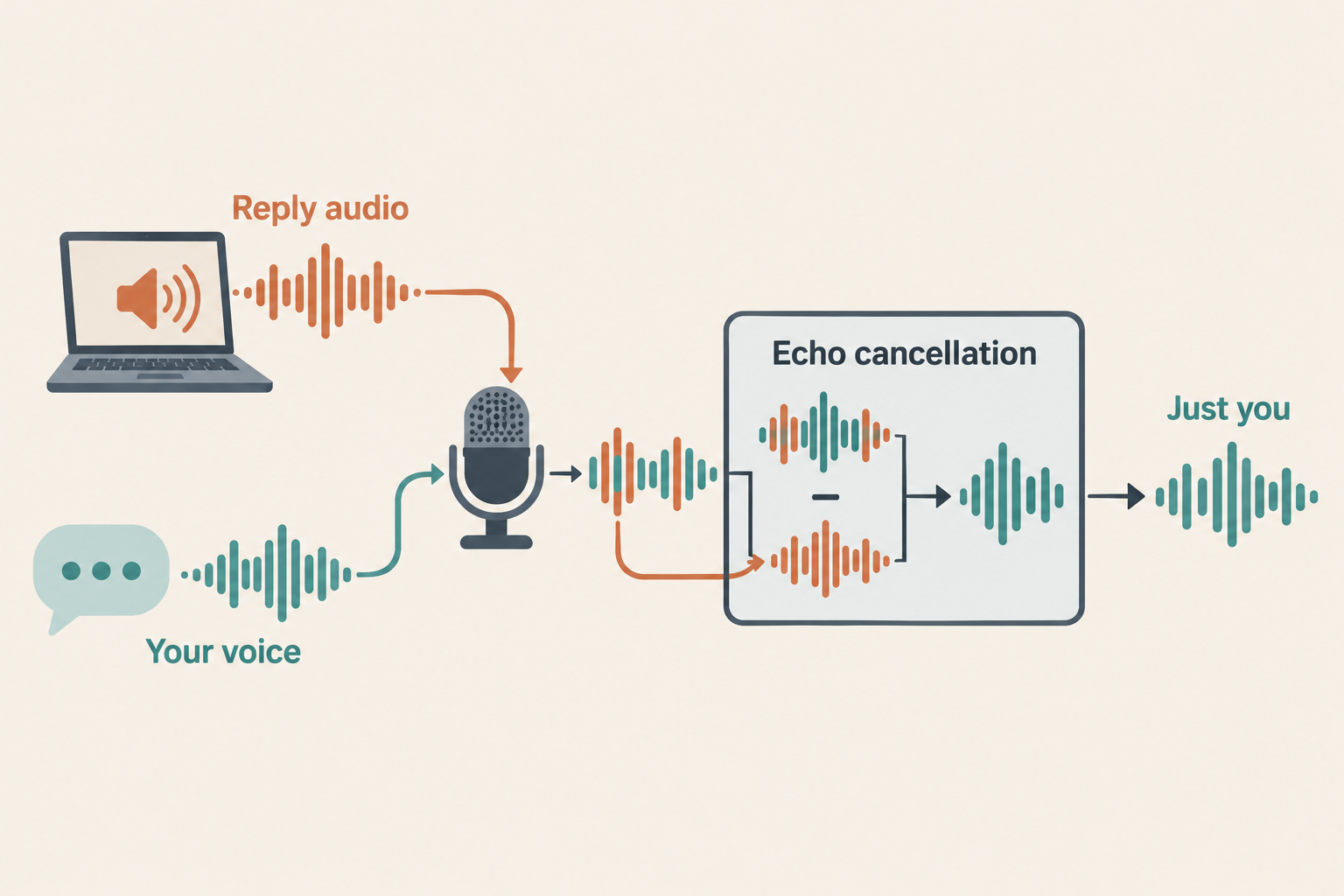
The tricky part is echo. On laptop speakers the mic hears Claude's voice too, so a basic speech detector would interrupt itself constantly. The fix was to stop playing replies with afplay and play them through a small Swift helper that uses Apple's voice processing - basically the same echo cancellation FaceTime uses. It subtracts what the Mac is playing from what the mic hears, so mostly my voice is left. In my tests Claude's own echo peaked well under the trigger, and a quick cough or "uh-huh" doesn't stop it.
I started with a 2-second window and it felt slow in practice, so it's down to one second now.
Starting a new session by voice
When I'm done with one topic I don't want the next one dragging the old context along. Saying "new session" (the whole turn, not just a sentence that mentions it) ends voice in the current session and starts a new one with voice already on.
My first version had Claude call the desktop app's session tool to start the new session. That failed - with Remote Control on, the app only lets a session be started from a message actually typed in the app. So now the mod just drives the app like I would: it clicks File, New Session, waits a second and a half, and types 0 and Enter. It's a bit of a hack, but it's faster since there's no model call in the middle.
What broke along the way
A few things that took some digging:
- Kokoro restarts itself every 25 requests. VoiceMode does this on purpose to work around a memory leak, and it takes about 10 seconds to come back. Any reply that landed in that gap just failed. The voice script now retries for up to 30 seconds.
- The wake word typed
000. Old test copies of the listener were still running in the background, so one "Hey Jarvis" turned into three zeros. It also clears the prompt box before typing now, in case something's left in it. - The mic went deaf. When my iPhone's Continuity mic showed up, the audio stream broke and the listener just sat there hearing nothing. It now reloads the device list each time it opens the mic, and reopens it if the audio stops for 2 seconds.
- Enter beat the zero. The first time the wake word fired, Claude got the
0but not the Enter. A short delay between the two fixed it.
Is it worth it?
For the kind of work I do by voice - triaging tasks, filing notes, quick research questions - yes, and it's a lot more natural than the first version. Being able to start it, interrupt it, and reset it without touching anything is what makes it feel like talking instead of operating a tool.
I'd still grab the keyboard for anything that needs careful reading. A 30-second spoken answer is still about my limit, and anything with real detail belongs in a file.
If you're building something similar, I'd start by moving the conversation out of the model. Everything else got easier once Claude only had to write replies.